Price: ₹8,530 - ₹5,530.00
(as of Dec 17, 2025 23:31:51 UTC – Details)
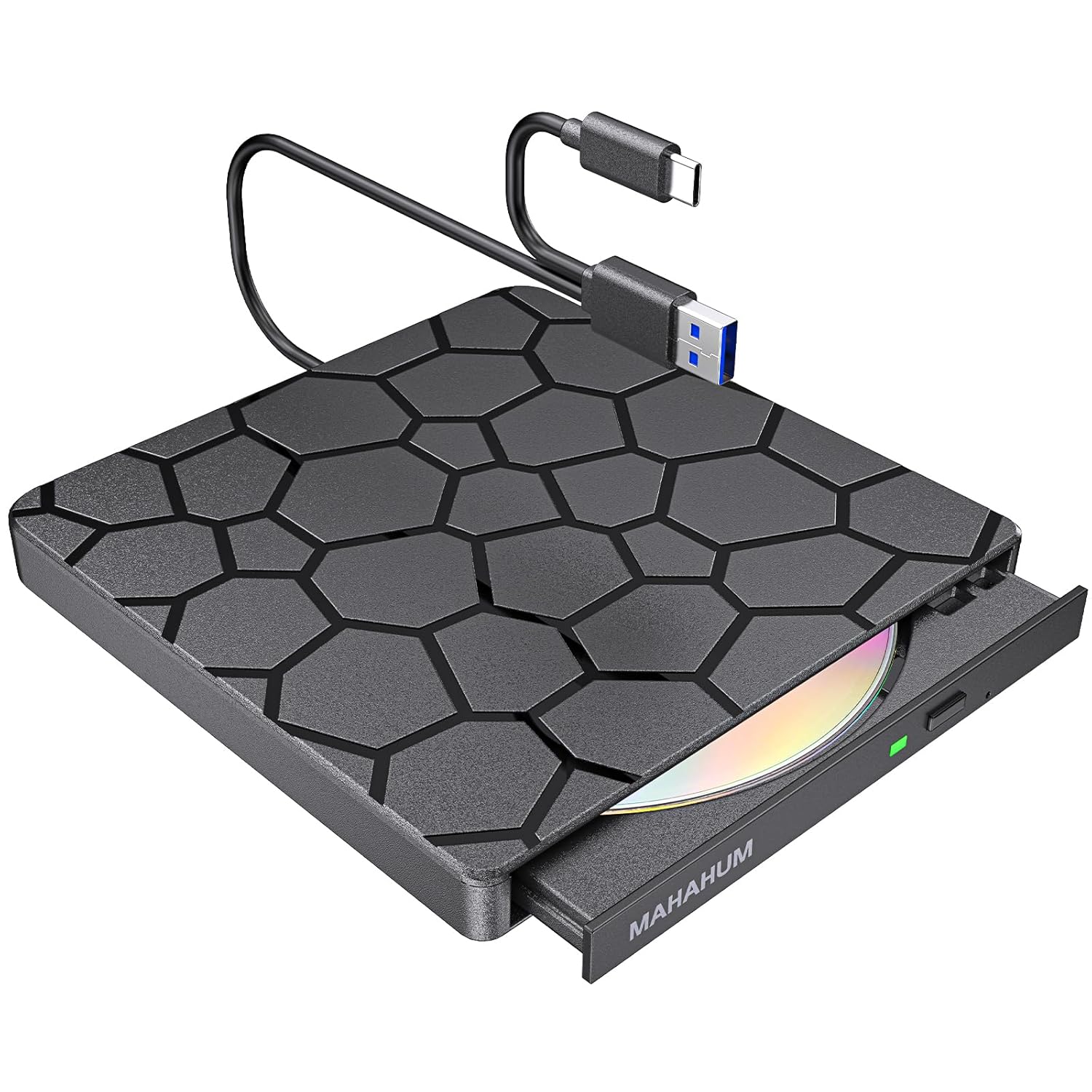
【Why choose MAHAHUM external cd/dvd drive for laptop?】
MAHAHUM external cd/dvd drive for laptop brings the classic carriers back to life:
☑Full Scenario Digital Hub – Play/Burn/Erase/Rewrite/Rip/Backup, one machine realizes full life cycle management of optical discs.
☑Cross-platform Plug & Play – Seamlessly compatible with Windows 11 to XP, macOS (with M1/M2/M3 chips), Linux.
☑Super-speed transfer experience – USB 3.0 5Gbps speed transfer, CD 24X/DVD 8X read/write, intelligent acceleration technology.
☑Dual power supply is more reliable – comes standard with a separate power cord for stable operation in high power consumption scenarios.
☑Portable and shockproof design – Ultra-thin body, business travel/teaching demonstration/data rescue travel without worry!
【Technical Specifications|Technical knowledge for greater peace of mind】
◆ Full Format Support:
Support the reading, burning (writing/rewriting), and ripping (digitizing) of multi-types of discs including CD-ROM, CD-R, CD± RW, DVD-ROM, DVD-RAM, DVD±R, DVD±RW, DVD±R DL, VCD, SVCD. (Blu-ray Disc is NOT supported)
◆ Smart Burning Recommendation:
CD recommended ≤10X burning | DVD recommended 4X-8X burning
Dual-layer DVD prioritizes 4X low speed to ensure data integrity
☑ Supported Devices
All Windows computers (XP/7/8/10/11)|All Mac models (including M1/M2/M3 chips)|Linux mainstream systems
☒ Incompatible Devices
Chromebooks/Car systems/Game consoles/Smart TVs/Tablet phones/Projectors|Blu-ray playback (DVD/CD only)
【Three minimalist steps|Newbies can easily get started!】
▎Windows System
① Plug and Play
Connect the USB-A or USB-C port of your computer with cable (Win11 requires internet connection to load the CD Rom External Drive for Laptop automatically)
② Region Code Setting
Right-click on the optical drive icon → Properties →Hardware→ Click “Properties” at the bottom→DVD region code set to #1 (5 modification opportunities only)
③ Playback/Burning
Insert a disc→Automatic recognition→Play movies with VLC or burn data with ImgBurn (power cord included to cope with high power consumption scenarios)
▎Mac system
① System Configuration
Open Finder > Settings > Ensure “CDs, DVDs, and iOS Devices” is checked in the General Tab and Sidebar Tab
② Native Burning
Insert a blank disc → Automatic recognition → Use the software to play, burn, or rip → right-click on the desktop icon and select “eject,” or choose “File” > “Eject” from the menu. (Note: The tray cannot open via the button due to MacOS limitations)
③ Mac OS Includes a Built-in Burning Function
Insert a blank disc → click ‘File → select ‘New Burn Folder → [Burn Folder] → drag in files → click [Burn to Disc] → eject the disc when finished (Note that Mac OS only supports burning blank discs, and each disc can be burned only once).
④ Professional Operation
DVD lossless ripping by HandBrake+VLC combination (MacBook recommended to connect the power supply to ensure stable power supply)
【Free Software Recommendations | Unlocking the Professional Experience】
◆ Video and audio playback
Such as VLC Player | Apple DVD Player
◆ CD Burning Tracks
Such as Windows Media Player | Apple Music
◆ DVD Data Burning
Such as ImgBurn | Burn for Mac
◆ Format Converter
HandBrake|Freemake
⚠ 【Important Notes on the Use of】 ⚠
!Region code needs to be set for the first time DVD playback (select #1 for US/Canada region, total modifications ≤ 5 times)
!Recording recommendation: CD ≤10X|DVD ≤8X|Double Layer DVD priority 4X Low Speed
!Mac system need to exit the disk through software (physical eject button is not effective)
!High power consumption scenarios must be connected to the included 5V power supply (e.g. burning dual-layer DVDs/external thin and light notebooks)
FAQ|Self Help Solutions
⚠ 【Windows cannot recognize the USB DVD Drive External?】
☑ Basic troubleshooting
Prioritize using the native USB-A/C cable the device to connect directly to the computer’s USB port
Replace the USB port test (avoid the blue USB 2.0 port)
High power consumption scenarios must be connected to the included 5V power supply
☑ Driver Reset Guide
① Win+X to open Device Manager →Click View → Check “Show Hidden Devices”.
② Expand DVD/CD-ROM → Uninstall the target device by right click.
③ Reboot your computer and replug the External Drive and reinstall the driver automatically (Win11 needs to stay connected).
⚠ 【Windows can read CD but can’t play DVD?】
☑ Mandatory Settings
◆ Use VLC player (Windows Media Player does not support DVD)
◆ Right-click on the optical drive icon → Properties →Hardware→ Click “Properties” at the bottom→DVD region code set to #1 (5 modification opportunities only)
⚠ 【Mac doesn’t show the optical drive icon?】
☑ System level fix
◆Finder→ Settings→General → Sidebar→Check “CD/DVD Devices”.
◆Only show the icon when inserting a burned CD (blank disk needs to start the burning software)
◆Recommended to connect USB-C docking station when using iMac/Mac Studio.
☑ Physical layer detection
◆ Trial playback of CD-ROMs of different ages (old disks before 2000 or incompatible)
◆ External CD/DVD Drive for Laptop spinning but no display? Force restart Finder process
【Legacy Media Adapter】 Compatible with Windows 11, 10, 8.1 (driver installation required for Windows) and Apple MacBook Air, iMac, Mac Mini, MacBook Pro devices; supports reading and writing multiple disc formats including CD±R, CD±RW, CD-ROM, DVD±R, DVD±RW, DVD-RAM; plays legacy media formats such as VCD and SVCD; please note, this External CD/DVD Drive is designed for standard CDs and DVDs and does NOT support Blu-ray, 4K discs, televisions, PS5, Xbox consoles, or tablets.
【High-Speed Lossless Transmission】 Achieves 8x DVD read speeds and 24x CD read/write speeds, transferring a full 700MB CD in ~3 minutes or 4.7GB DVD in ~10 minutes – 3x faster than standard Drives. Features dual USB 3.0 + USB-C ports for universal plug-and-play compatibility with Ultrabooks, M1/M2 MacBooks, and desktops. Delivers Gbps-level transfers for instant, lag-free movie playback and CD audio streaming without distortion.
【Super-Tough External DVD Drive for Laptop】 Engineered with lightweight yet durable scratch-resistant housing and integrated cable management system. Its ultra-compact, travel-ready design effortlessly fits in laptop sleeves, backpacks, or large pockets. True plug-and-play simplicity: Connect via USB for instant disc playback or burning – no external power or drivers required.
【Digital Archive Solution】 Go beyond playback with intelligent one-click burning to archive MP3s, videos, and photos onto CD/DVD±R/RW media. Convert legacy content by ripping audio CDs/DVDs to MP3/MP4 files for permanent digital preservation. Maintain systems using Windows/macOS installation discs and retro game software compatibility.
【Disc Recovery Specialist】 Precision-engineered with 100% new-gen laser modules + automatic error-correction for damaged/scratched disc recovery. Anti-vibration construction maintains stability on uneven surfaces. Whisper-quiet <28dB operation enables nighttime use. Includes 24/7 data rescue support + 2-year warranty.
【Notice】 Compatible: Win7+/macOS10.6+/Linux (no drivers). Connections: USB-C→Modern laptops / Power cord→Old PCs. ✘ Not for: Mobile/TV/Car/PS/Xbox/Chromebook/Ubuntu/Blu-ray/4K. Mac Eject: Right-click→Eject or Finder→File→Eject. Stuck? 5-sec button press. SW: VLC (play) / Nero|Burn (burn). Legacy: Win98/XP/Vista DL drivers.






 Pick up from the Woodmart Store
 Courier delivery
 DHL Courier delivery




 Warranty 1 year
 Free 30-Day returns

 Overview
 Processor
 Display
 RAM
RAM
 Storage
 Video Card
 Connectivity
 Features
 Battery
 General


Reviews
Clear filtersThere are no reviews yet.