





-
 Pick up from the Woodmart Store
-
 Courier delivery
-
 DHL Courier delivery




 Pick up from the Woodmart Store
Courier delivery
DHL Courier delivery
Pick up from the Woodmart Store
Courier delivery
DHL Courier delivery
 Warranty 1 year
 Free 30-Day returns

Price: ₹72,900 - ₹64,999.00
(as of Nov 21, 2025 20:41:52 UTC – Details)
From the manufacturer

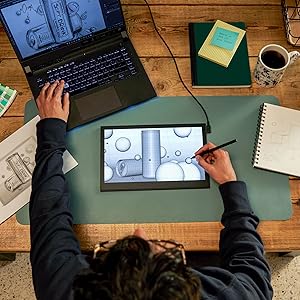
What if you could turn any place into your own studio? Like the café you stopped by after leaving an art exhibition. Or the library you visited to do some research. Or the bed you plopped down on to clear your head. Something clicks, and you seize the moment, moving your pen across the screen before the idea gets away. With a tool that’s always ready to go, the world is your studio.

An exceptional drawing experience on Wacom’s first ever OLED display
Both Pantone Validated and Pantone
SkinTone Validated, Movink’s 13.3″ full HD Samsung OLED display produces a wider spectrum of more vivid, higher-definition colors than past displays. With a vastly improved contrast ratio of 100,000:1, its much deeper blacks more accurately reflect your artistic vision. Featuring our slimmest bezel yet, Movink provides a compact yet formidable workstation for creativity.

Wacom’s lightest and thinnest pen display ever
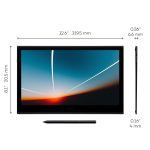
Compact, slim, and sturdy, this 13” display weighs under a pound and is just 4-6.6 mm thick. Wacom Movink’s magnesium alloy exterior is lightweight yet durable enough to carry in a bag, turning any spot into your creative space – be it a café, library, or your bed. Connect it to your Mac or PC, and you’ll have the processing power you need for your professional work, in a graphics tablet that’s always ready to go.

A professional tool that works like a dream
Wacom Movink features advanced 10-point multi-touch technology, letting you interact with your content using both fingers and the pen. Use natural gestures like panning, zooming, and rotating for an immersive creative experience. It also includes touch-selective shortcuts like touch keys, Radial Menus, Grid Panels, and pen gestures, that you can assign as shortcuts to increase efficiency in your favorite software programs.
Specially designed Wacom Pro Pen 3, enhanced for Wacom Movink
Wacom Movink is compatible with Wacom Pro Pen 3. Offering impressive pen sensitivity and tilt detection, our latest pen lets you create everything from powerful brushstrokes to delicate lines just as you envision them. It has a narrower yet more visible nib, and is composed of interchangeable parts so you can customize it the way you want: change the grip thickness, adjust its center of gravity, or add and remove side switches. Pro Pen 3 brings you closer than ever to the pen-on-paper experience.
The Wacom Pro Pen 3 packaged with Wacom Movink is an exclusive model featuring a nib remover that can be attached to the end of the pen, which also holds three replacement nibs. Nib emergencies will never be a problem again, even when you’re on the go.

Ways to connect your Movink
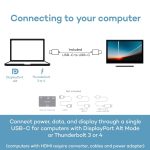
Wacom Movink can be connected to nearly any device with a USB-C port (DisplayPort Alt Mode or Thunderbolt)
with the included USB-C to USB-C cable. If you need to connect via HDMI, you will need to purchase the Wacom Converter (ACK45219Z), HDMI & USB cables and a power adapter, enabling you to get full 10-bit color on your Wacom Movink with an HDMI connection to your computer.

Creative software
If you already have a preferred creative software choice, Wacom Movink is natively compatible with it. But if you’re on the hunt for something new, every Movink purchase gives you access to a range of trials for top-tier creative software applications such as Clip Studio Paint EX, Rebelle 7, Capture One, Magma pro plan, and 250GB of MASV file transfer service.
Hardware requirements USB-C port with DisplayPort Alt Mode or Thunderbolt 3 or later System requirements PC: Windows 10 or later (Latest service pack/ build), Mac: macOS 12 or later (Latest update), Android*: Android 8.0 and above, ChromeOS**: The latest version of ChromeOS Connectivity USB-C, Computers without USB-C DisplayPort Alt Mode or Thunderbolt 3/4 require Wacom Converter, HDMI & USB cables and power adapter (sold separately). Optional Accessories Wacom Converter for HDMI (ACK45219Z), Wacom Color Manager (EODIS3-DCWA)
Thin, Lightweight Display: Wacom drawing tablet features OLED display, weighs less than 1 lb. and measures 4-6.6mm thick; Compact digital art tablet ideal for use on campus, in the studio, or at home
Remarkable Pen Performance: Exclusively designed for the Movink drawing tablet, the included Pro Pen 3 has extra nibs stored in the back end, features 8k pressure sensitivity and three side switches
Vibrant Color: ChromeOS, Android, macOS and Windows tablet features 10-bit color, contrast ratio of 100,000:1, and hardware presets for Adobe RGB, sRGB, DCI-P3 and Rec. 709, EBU, & Rec2020
Touchscreen & Shortcut Keys: Pantone verified graphic tablet provides easy navigation with touch gestures, on-screen shortcuts, and ExpressKeys, all customizable to streamline your creative workflow
Includes: Movink 13 digital drawing pad, Pro Pen 3, USB-C cable for connectivity and charging (1m), Nib holder with 3 replacement Nibs (1 standard, 2 felt), Nib remover, quick start guide, and professional software trials
 Overview
 Processor
 Display
 RAM
RAM
 Storage
 Video Card
 Connectivity
 Features
 Battery
 General
In stock
In stock
In stock


Reviews
Clear filtersThere are no reviews yet.